DropLens is designed for desktop — continue on droplens.app from your computer for the full experience.
Droplens
Features How it works Pricing
Built on GA4 Data API · 7-day free trial

See exactly why
your revenue moved.

Revenue analytics connected directly to your GA4 property.
Decompose every KPI swing into the channel, device, and category that drove it — in seconds.

See how it works

— € per user per GA4 property / month after trial · cancel anytime · no credit card to start

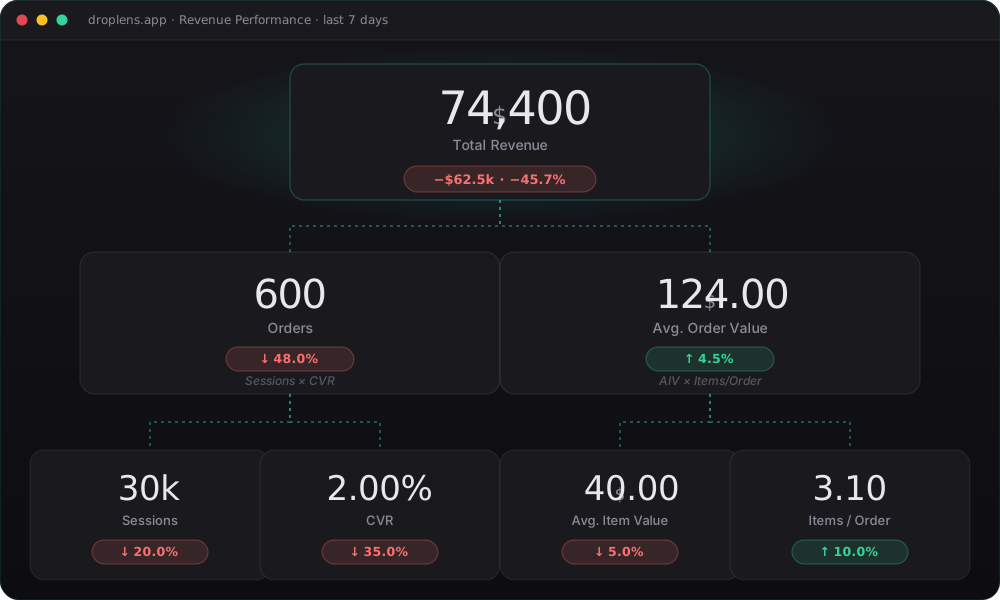
DropLens revenue decomposition tree

How it works

From sign-in to insight in under a minute.

1

Sign in with Google

One-click Google sign-in. We request read-only access to your Analytics account — nothing else.

2

Pick a GA4 property

We list every GA4 property you have access to. Pick one and we pull the data live — no copy-paste, no CSV exports.

3

Find the cause

Compare any period to any other. Drill from total revenue down to the exact channel, device, or category that moved it.

How you use it

From total revenue to the exact lever — in four clicks.

Every GA4 report tells you a number changed. DropLens walks you from that headline number down to the segment, the lever, and the row that actually moved it.

Step 1
🌳

Decompose revenue

Total revenue breaks into Sessions × CVR × AIV × Items per Order. Each card shows its own delta vs. the comparison period — so you immediately see which lever moved the headline.

Step 2
📊

Spot which segment dragged it down

The drivers waterfall splits revenue by channel, device, and new vs. returning. At a glance you see exactly which segments lost the most — and which lifted. Click the worst offender to filter to those sessions only.

Step 3
🎯

Re-decompose for that segment

With the filter applied, the KPI tree refreshes for those sessions alone. Now you see whether the drop came from their Sessions, CVR, AIV, or Items/Order — not the blended average across your whole site.

Step 4
🔍

Drill the lever

From the segment's KPI tree, open the CVR funnel to spot the failing step (session_start → view_item → cart → checkout → purchase), or the category breakdown for AIV / Items per Order. The story ends at one row.

Pricing

One plan. One price. Per user, per property.

Pay only for the seats you actually use. Each teammate subscribes to the properties they need — no enterprise-tier minimums.

7-day free trial
— / user / property / month
  • Full KPI tree, drivers waterfall, CVR funnel
  • Live GA4 Data API — no exports, no SQL
  • Compare any period to any other
  • Connect as many GA4 properties as you want
  • Cancel from inside the app — no email-us-to-cancel nonsense

No credit card required to start. We'll ask for billing details on day 8.

Droplens

Revenue analytics for GA4 e-commerce. Connect your property, see what's driving the change.

Product

  • Features
  • How it works
  • Pricing
  • FAQ

Legal

  • Privacy
  • Terms
© 2026 Droplens · Built on the GA4 Data API DropLens is not affiliated with, endorsed by, or sponsored by Google LLC. "Google", "Google Analytics", and "GA4" are trademarks of Google LLC.
Droplens

Revenue analytics connected
directly to your GA4 property

Best on desktop

DropLens packs dense charts and drill-downs that need a wider screen. Open this on your computer to see the full dashboard.

droplens.app
GA4 Property

Connect Google Analytics to begin.

Trial ended

Subscribe to keep tracking this property.

Cancel anytime. Each property is billed separately.

Trial ends in 3 days

Revenue Performance

Primary
📅 Select a property ▾
Primary period
→
Compare
🔁 — ▾
Comparison period
→
Showing a partial sample — your date range is too large for a full breakdown, so revenue totals here are incomplete. Pick a shorter range for accurate numbers.
Filters
Use "See and filter by drivers" to open the breakdown panel and click bars to filter

Revenue Decomposition

£415,000
Total Revenue
+£115k +38.3%
Tip: click the button above to open the breakdown panel, then isolate the channel, device or audience driving most of the swing — the whole dashboard re-scopes to that segment.
5,000
Orders
+25.0%
Sessions × CVR
£83.00
Avg. Order Value
+10.7%
AIV × Items/Order
185k
Sessions
↑ 9.8%
2.70%
CVR orders/sess
↓ 1.2%
£54.50
Avg. Item Value
↑ 4.2%
1.52
Items / Order
↑ 3.4%
Breakdown Drivers
📺 Media Channels
📱 Devices
👤 New vs Returning
Active filters:
Clear all
Baseline/Final
Positive
Negative
💡 Click a bar to filter · Click again to deselect
Baseline/Final
Positive
Negative
💡 Click a bar to filter · Click again to deselect
Baseline/Final
Positive
Negative
💡 Click a bar to filter · Click again to deselect
📡
Sessions by Channel
Waterfall of session change vs comparison period
Baseline/Final
Gain
Loss
🔀
Conversion Funnel
% of total sessions · delta vs comparison · CVR contribution
📦
Category impact on Avg. Item Value
Contribution of each category to the overall change
Baseline/Final
Improvement
Drag
🛒
Category impact on Items / Order
Contribution of each category to the overall change
Baseline/Final
Improvement
Drag

Manage subscriptions
Loading…
Loading your data…
Fetching from GA4 — this can take up to 30 seconds.